Mappatura Porte per eMule

Mappatura Porte per eMule
Ciao a Tutti!
Anch'io ho problemi con la mappatura delle porte, potreste aiutarmi?
Ho visitato il sito che consigliate nel tutorial, ma il modello del mio router non c'è e quello precedente è un po' diverso.Quindi chiedo il vostro prezioso aiuto!!
Ho un Modem/Router 54G Turbo WL-174 della Sitecom.
Apro Advance Setup

Poi seleziono Multiple così si aggiunge la voce IP Address Mapping, clicco su questa e si apre questa pagina in cui ho selezionato Many to One

E' qui che non riesco ad orientarmi.Help!!
Ah, non ho una base airport esterna!
Grazie!!
Anch'io ho problemi con la mappatura delle porte, potreste aiutarmi?
Ho visitato il sito che consigliate nel tutorial, ma il modello del mio router non c'è e quello precedente è un po' diverso.Quindi chiedo il vostro prezioso aiuto!!
Ho un Modem/Router 54G Turbo WL-174 della Sitecom.
Apro Advance Setup
Poi seleziono Multiple così si aggiunge la voce IP Address Mapping, clicco su questa e si apre questa pagina in cui ho selezionato Many to One
E' qui che non riesco ad orientarmi.Help!!
Ah, non ho una base airport esterna!
Grazie!!
-
flashcream

- Posts: 38388
- Joined: Fri Apr 22, 2005 8:41 pm
no, nulla di quello che hai fatto. la mappatura porte si fa in virtual server
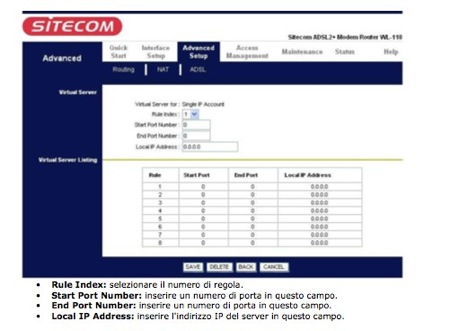
qui il manuale in italiano: http://www.sitecom.com/showdownload.php?id=3133
rule index: metti 1, poi 2, poi 3 dal momento che dovrai creare 3 regole distinte. ecco la prima:
start port: 4662
end port: 4662
local IP: l'ip assegnato dal router al tuo mac.
i numeri delle 3 porte li vedi qui: http://www.tuttologia.com/tutorial/aMule.html
qui il manuale in italiano: http://www.sitecom.com/showdownload.php?id=3133
rule index: metti 1, poi 2, poi 3 dal momento che dovrai creare 3 regole distinte. ecco la prima:
start port: 4662
end port: 4662
local IP: l'ip assegnato dal router al tuo mac.
i numeri delle 3 porte li vedi qui: http://www.tuttologia.com/tutorial/aMule.html
-
flashcream
- Posts: 38388
- Joined: Fri Apr 22, 2005 8:41 pm
hai due modi per vedere l'IP assegnato dal router al mac: nelle configurazione del router o in pref. sistema del mac/network--> pannello TCP/IP. non so se in status.... ho già cestinato il manuale. 
cmq parliamo dell'IP privato, perchè quello assegnato dal provider a te non interessa ai fini della mappatura. con probabilità sarà 192.168.0.2 o 192.168.0.100, se non ci sono collegati altri computer al router.
cmq parliamo dell'IP privato, perchè quello assegnato dal provider a te non interessa ai fini della mappatura. con probabilità sarà 192.168.0.2 o 192.168.0.100, se non ci sono collegati altri computer al router.

KAD: firewalled ..to be continued :(
ciao, mi son letto vari post vecchi sull'argomento kad firewalled e questa situazione sembra essere identica alla mia, ho fatto come avete indicato a Daisy ma ancora non riesco a sblocarlo; praticamente la ma situazione è questa:
- macbook 13' mac osx 10.4.10
- amule 2.1.3
- firewall disattivato sia su mac che su router
- le 3 porte mappate nel router
- modem/router spento e riacceso dopo il campio nel setup
- amule chiuso e riattivato
...ma ancora amule dice kad:firewalled
allego foto a riprova:


...sono un caso impossibile?
MacMox
- macbook 13' mac osx 10.4.10
- amule 2.1.3
- firewall disattivato sia su mac che su router
- le 3 porte mappate nel router
- modem/router spento e riacceso dopo il campio nel setup
- amule chiuso e riattivato
...ma ancora amule dice kad:firewalled
allego foto a riprova:
...sono un caso impossibile?
MacMox

 [/URL][/IMG]
-
flashcream
- Posts: 38388
- Joined: Fri Apr 22, 2005 8:41 pm
macmox, esiste il tasto "anteprima messaggio" da usare nel dubbio e prima di inviare la risposta.
ora elimino i tuoi post e chiudo il topic. posta in quello che hai già aperto: http://www.tuttologia.com/macp2p/showthread.php?t=23112
ora elimino i tuoi post e chiudo il topic. posta in quello che hai già aperto: http://www.tuttologia.com/macp2p/showthread.php?t=23112

Ciao Flash, scusami, probabilmente non è qui che devo chiederlo ma sono appena arrivata e non mi so giostrare ancora bene all'interno del forum. Avrei una domanda che potrà sembrarti stupida ... quando clicco per aprire i file allegati a qualche commento, si apre ma non è sufficientemente grande per poterlo leggere. Almeno questo è quello che mi è successo aprendone almeno due in due discussioni diverse.
Oltre a cliccarci sopra due volte per poterlo ingrandire cosa dovrei fare??? Ingrandendo ulteriormente la finestra, l'immagine chiaramente diventa sempre più pixerata e quindi il file è illeggibile. Scusa ancora il disturbo e grazie
Oltre a cliccarci sopra due volte per poterlo ingrandire cosa dovrei fare??? Ingrandendo ulteriormente la finestra, l'immagine chiaramente diventa sempre più pixerata e quindi il file è illeggibile. Scusa ancora il disturbo e grazie