dvx mac

Cmq quando provo ad aprire un file con VLC mi dice
Si è verificato un'errore che haprobabilmente impedito la corretta esecuzione del programma.
mpgv: cannot peek
ps: cannot peek
mjpeg: cannot peek
ps: cannot peek
main: no suitable demux module for `
access_file: read failed (Input/output error)
access_file: read failed (Input/output error)
access_file: read failed (Input/output error)
access_file: read failed (Input/output error)
access_file: read failed (Input/output error)
access_file: read failed (Input/output error)
access_file: read failed (Input/output error)
access_file: read failed (Input/output error)
access_file: read failed (Input/output error)
access_file: read failed (Input/output error)
access_file: read failed (Input/output error)
access_file: read failed (Input/output error)
access_file: read failed (Input/output error)
access_file: read failed (Input/output error)
access_file: read failed (Input/output error)
access_file: read failed (Input/output error)
access_file: read failed (Input/output error)
access_file: read failed (Input/output error)
access_file: read failed (Input/output error)
access_file: read failed (Input/output error)
access_file: read failed (Input/output error)
access_file: read failed (Input/output error)
access_file: read failed (Input/output error)
access_file: read failed (Input/output error)
access_file: read failed (Input/output error)
access_file: read failed (Input/output error)
access_file: read failed (Input/output error)
Se pensi si tratti di un bug,segui le istruzioni a: http://www.videolan.org/support/bug-reporting.html
Si è verificato un'errore che haprobabilmente impedito la corretta esecuzione del programma.
mpgv: cannot peek
ps: cannot peek
mjpeg: cannot peek
ps: cannot peek
main: no suitable demux module for `
access_file: read failed (Input/output error)
access_file: read failed (Input/output error)
access_file: read failed (Input/output error)
access_file: read failed (Input/output error)
access_file: read failed (Input/output error)
access_file: read failed (Input/output error)
access_file: read failed (Input/output error)
access_file: read failed (Input/output error)
access_file: read failed (Input/output error)
access_file: read failed (Input/output error)
access_file: read failed (Input/output error)
access_file: read failed (Input/output error)
access_file: read failed (Input/output error)
access_file: read failed (Input/output error)
access_file: read failed (Input/output error)
access_file: read failed (Input/output error)
access_file: read failed (Input/output error)
access_file: read failed (Input/output error)
access_file: read failed (Input/output error)
access_file: read failed (Input/output error)
access_file: read failed (Input/output error)
access_file: read failed (Input/output error)
access_file: read failed (Input/output error)
access_file: read failed (Input/output error)
access_file: read failed (Input/output error)
access_file: read failed (Input/output error)
access_file: read failed (Input/output error)
Se pensi si tratti di un bug,segui le istruzioni a: http://www.videolan.org/support/bug-reporting.html
-
flashcream

- Posts: 38388
- Joined: Fri Apr 22, 2005 8:41 pm
si.
1) scarica da qui: http://downloads.videolan.org/pub/video ... -intel.dmg
2) cestina la vecchia applicazione.
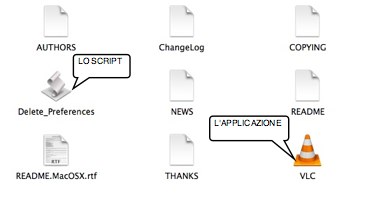
3) esegui lo script di eliminazione delle preferenze e poi installa l'applicazione trascinandola dal file immagine montato in applicazioni. cestina pure lo script. apri l'applicazione. (nb: sia lo script che l'applicazione sono contenuti nel dmg che hai scaricato).
1) scarica da qui: http://downloads.videolan.org/pub/video ... -intel.dmg
2) cestina la vecchia applicazione.
3) esegui lo script di eliminazione delle preferenze e poi installa l'applicazione trascinandola dal file immagine montato in applicazioni. cestina pure lo script. apri l'applicazione. (nb: sia lo script che l'applicazione sono contenuti nel dmg che hai scaricato).
Cmq quando provo ad aprire un file con VLC mi dice
Si è verificato un'errore che ha probabilmente impedito la corretta esecuzione del programma.
Se pensi si tratti di un bug,segui le istruzioni a: http://www.videolan.org/support/bug-reporting.html
Si è verificato un'errore che ha probabilmente impedito la corretta esecuzione del programma.
Se pensi si tratti di un bug,segui le istruzioni a: http://www.videolan.org/support/bug-reporting.html
-
flashcream
- Posts: 38388
- Joined: Fri Apr 22, 2005 8:41 pm

 Per caso sei già occupato?!?!

