Spessore linea con Graphic Converter
Posted: Tue Jan 08, 2008 5:38 am
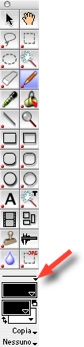
Lo so, la domanda è scema, ma non ci riesco: come diavolo si fa a cambiare lo spessore delle linee che si tracciano in Graphic Converte? Dalle istruzioni:
You can paint in the picture using the paint tools from the toolbox (Window / Show
Toolbox). Use the Pen , for example, you can select its line thickness in the
pop-up menu immediately above the Pattern picker. If you have not installed interfering
programs like, for example, USB Overdrive, you can change the line thickness
or size of the selected tool by holding down the Shift key and adjusting the
scroll wheel on your mouse.
Io di menu pop-up non ne vedo comparire. Chi vuole aiutarmi, per cortesia?
You can paint in the picture using the paint tools from the toolbox (Window / Show
Toolbox). Use the Pen , for example, you can select its line thickness in the
pop-up menu immediately above the Pattern picker. If you have not installed interfering
programs like, for example, USB Overdrive, you can change the line thickness
or size of the selected tool by holding down the Shift key and adjusting the
scroll wheel on your mouse.
Io di menu pop-up non ne vedo comparire. Chi vuole aiutarmi, per cortesia?